OpenSCAD - cad
Customizer Options
Common Gotcha's
- You must scale things by (I think) 1.001 to properly cut out a segment of something. THIS COULD BE A MIS-SPEC. It could be 1.0001 or something else. I haven't found the exact location of where this is specified (significant digits)
- Watch for extra commas at the end of your function calls' argument list. This could be considered common but for pythonistas it could be considered a gotcha.
Simple Examples for Quick Reference
// a simple hollowed out cylinder; or a ring
// variables are previously defined and this is translated to become zeroed out on the z-axis (the first line)
translate([0, 0, length / 2])
difference() {
    cylinder(
        h=length,
        r=outer_radius,
        center=true
    );
    scale([1, 1, 1.001])
    cylinder(
        r = inner_radius,
        h = length,
        center = true
    );
}
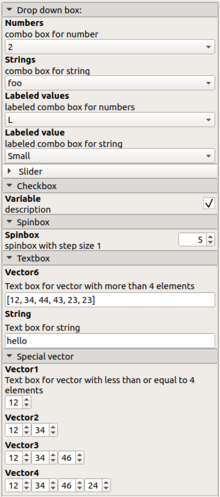
Customizer most options
/* [Drop down box:] */
// combo box for number
Numbers=2; // [0, 1, 2, 3]

// combo box for string
Strings="foo"; // [foo, bar, baz]

//labeled combo box for numbers
Labeled_values=10; // [10:L, 20:M, 30:XL]

//labeled combo box for string
Labeled_value="S"; // [S:Small, M:Medium, L:Large]

/*[ Slider ]*/
// slider widget for number
slider =34; // [10:100]

//step slider for number
stepSlider=2; //[0:5:100]

/* [Checkbox] */

//description
Variable = true;

/*[Spinbox] */

// spinbox with step size 1
Spinbox = 5;

/* [Textbox] */

//Text box for vector with more than 4 elements
Vector6=[12,34,44,43,23,23];

// Text box for string
String="hello";

/* [Special vector] */
//Text box for vector with less than or equal to 4 elements
Vector1=[12]; //[0:2:50]
Vector2=[12,34]; //[0:2:50]
Vector3=[12,34,46]; //[0:2:50]
Vector4=[12,34,46,24]; //[0:2:50]